Enclosure Design
Design specifications and constraints for the Dilder 3D-printed case.
Form Factor
Style: Landscape rectangle — "iPod Nano" layout with display dominating the left face and a compact button cluster on the right.
Concept renders:
v1 — Initial rough layout

v2 — Dimension-accurate revision (current reference)
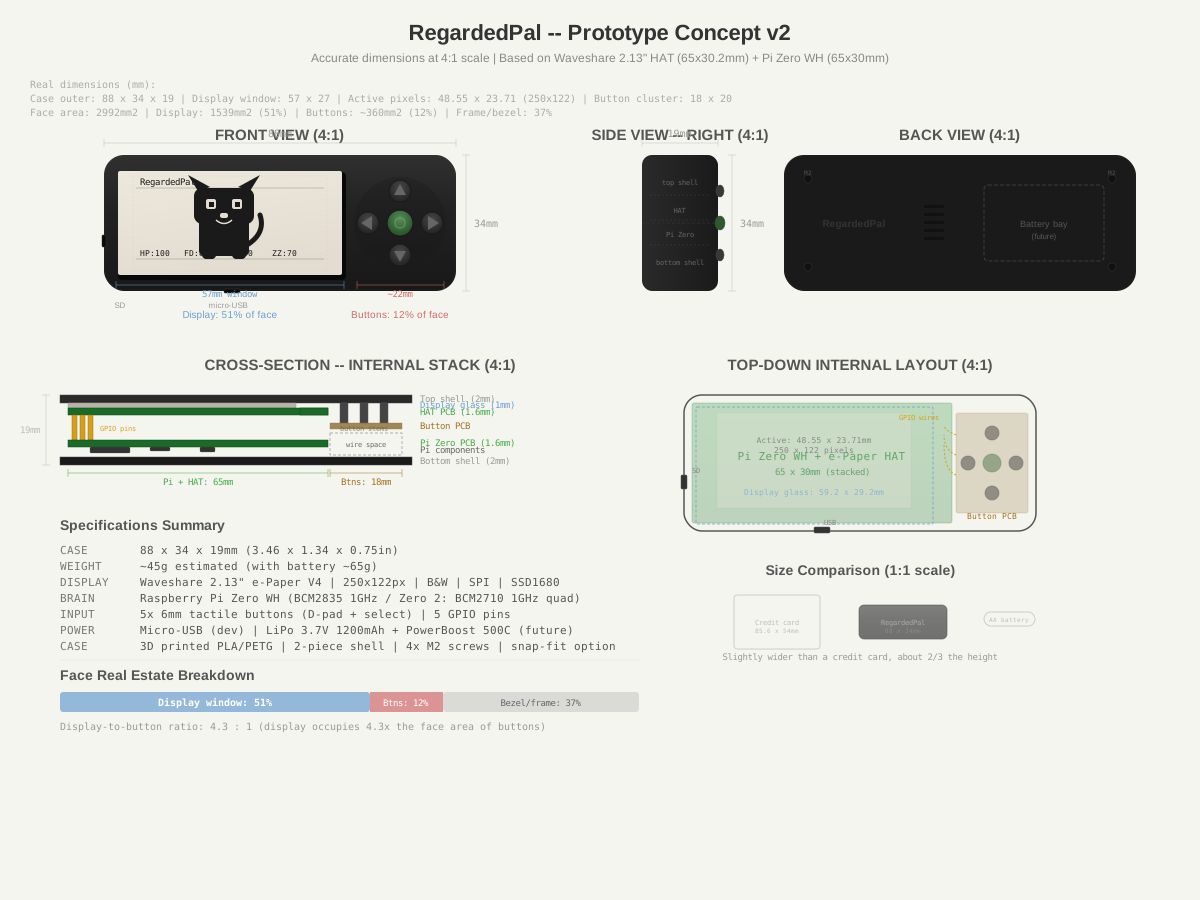
v2 Dimensions
| Metric | Value |
|---|---|
| Case outer dimensions | 88 × 34 × 19mm |
| Display window cutout | 57 × 27mm |
| Active pixel area | 48.55 × 23.71mm (250×122 px) |
| Button cluster width | ~22mm |
| Button center-to-center | ~10mm |
| Display face coverage | 51% |
| Button face coverage | 12% |
| Display-to-button ratio | 4.3 : 1 |
| Estimated weight | ~45g bare / ~65g with battery |
| Size reference | Slightly wider than a credit card, ~2/3 the height |
Component Dimensions
Sourced from official datasheets and measured hardware.
| Component | Dimension | Source |
|---|---|---|
| Pi Zero board | 65 × 30 × 5mm | Official Raspberry Pi spec |
| Waveshare HAT board | 65 × 30.2mm | Waveshare specification |
| Display glass outline | 59.2 × 29.2 × 1.05mm | V3/V4 specification PDF |
| Display active area | 48.55 × 23.71mm | V3/V4 specification PDF |
| Dot pitch | 0.194 × 0.194mm | V3/V4 specification PDF |
| Pi + HAT stack height | ~15mm (with header) | Measured |
| 6×6mm tactile button | 6 × 6 × 4.3–9.5mm | Standard spec |
Design Constraints
These constraints must be satisfied by any enclosure design:
- Display cutout: 57 × 27mm with 1mm case lip overlap around display glass
- Button holes: 5× circular apertures, ~7mm diameter, d-pad cross pattern with ~10mm center-to-center
- USB access: Micro-USB slot on bottom edge (power and data during development)
- SD card access: Slot on left edge (SD card can be removed without disassembly)
- Assembly: 2-piece shell (top + bottom), 4× M2 corner screws
- Shell seam: Horizontal split at case midpoint (~9.5mm from each face)
- Battery bay: Reserved space on right side behind button PCB — 30 × 19mm footprint (Phase 6)
- Ventilation: 5× slot vents on back panel
Material Options
| Material | Pros | Cons |
|---|---|---|
| PLA | Easy to print, good detail, cheap | Brittle, warps in heat |
| PETG | Tougher than PLA, better heat resistance | Slightly harder to print, less detail |
| ABS | Good mechanical properties | Warps badly without enclosure, fumes |
| ASA | Weather resistant, UV stable | Expensive, similar print difficulty to ABS |
Recommendation for prototype: PLA. Fast to iterate, lowest barrier to getting prints done. Switch to PETG or ASA for a final build.
Future Revisions
- v3: Incorporate real component fits once hardware is in hand — verify Pi + HAT stack height, button stem height clearance
- v4: Add lanyard loop, redesign battery bay for specific battery model
- Final: Remove breadboard references, finalize internal PCB mount points